

As an Amazon Associate, Den of Laptop earns from qualifying purchases.
Looking for the best metal gaming laptops in 2026? Specs sure makes the headlines, but build quality decides how a laptop feels after two years of regular gaming. An aluminum or magnesium-alloy chassis flexes less, spreads heat better and feels more premium than plastic laptops.
We picked the five best metal gaming laptops with current hardware – Intel Core Ultra HX and Panther Lake processors, and NVIDIA RTX 50-series graphics – for AAA gaming, streaming and creative work. Every pick below has a metal lid or a full aluminum body.
Updated November 2026: added the 2026 ASUS ROG Zephyrus G16, refreshed every obsolete link and noted the new Lenovo Legion Pro 7i Gen 11.
Top Picks
- Best Overall: Lenovo Legion Pro 7i Gen 10 Gaming Laptop
- Best Premium & 18-Inch: MSI Titan 18 HX AI (2026) Gaming Laptop
- Best for Creators: ASUS ROG Zephyrus G16 (2026) Gaming Laptop
- Best Value & Best 14-Inch: HP OMEN Transcend 14 Gaming Laptop
- Best Thin & Stylish: Razer Blade 16 (2026) Gaming Laptop
Best Metal Gaming Laptops : Quick Comparison
Here is how the best metal gaming laptops compare at a glance:
| Laptop | CPU | GPU | Display | Chassis | Buy |
|---|---|---|---|---|---|
| Lenovo Legion Pro 7i Gen 10 | Core Ultra 9 275HX | RTX 5080 | 16″ 2.5K OLED 240Hz | Aluminum lid + bottom | Check Price |
| MSI Titan 18 HX AI (2026) | Core Ultra 9 290HX | RTX 5090 | 18″ UHD+ Mini LED 240Hz | Magnesium-aluminum alloy | Check Price |
| ASUS ROG Zephyrus G16 (2026) | Core Ultra 9 386H | RTX 5080 | 16″ 2.5K OLED 240Hz | CNC aluminum unibody | Check Price |
| HP OMEN Transcend 14 | Core Ultra 9 285H | RTX 5070 | 14″ 3K OLED 120Hz | Metal body | Check Price |
| Razer Blade 16 (2026) | Core Ultra 9 386H | RTX 5070 Ti | 16″ QHD+ OLED 240Hz | CNC aluminum unibody | Check Price |
Why Choose a Metal Gaming Laptop?
The best metal gaming laptops feel solid the moment you open them. Aluminum and magnesium-alloy panels flex less than plastic, so the keyboard deck stays firm and the hinge area holds up better over years of opening and closing.
Metal also resists dents and scratches better, keeps its premium look for longer and helps spread heat away from the CPU and GPU. CNC-machined aluminum lets brands like Razer and ASUS build laptops under 15mm thick without losing rigidity.
The trade-offs are price and surface heat. Metal bodies cost more to manufacture, and the outer shell can feel warm during long gaming sessions – which is why the cooling system matters as much as the material.
Do Metal Gaming Laptops Run Cooler?
Yes, but with one catch. Aluminum conducts heat far better than plastic, so a metal chassis spreads heat across the body instead of holding it near the CPU and GPU.
The catch is that the surface gets warm. Tom’s Guide measured 118°F on the underside of the 2026 Razer Blade 16 under gaming load. Real cooling comes from the vapor chamber, fans and power limits, so treat the metal body as a bonus, not the whole cooling system. If your current laptop already runs hot, see our guide on how to cool down a laptop without a cooling pad.
Metal Body Laptop vs Plastic
| Aspects | Metal Body Laptops | Plastic Body Laptops |
|---|---|---|
| Durability | Stronger and more durable, can withstand harsher manipulation | Less fragile and can handle small impacts, but can crack open with too much impact |
| Manufacturing | Machined from a block of aluminum or magnesium alloy, time-consuming and expensive | Can be made using injection molding, faster and less expensive |
| Weight | Heavier due to metal body | Lighter due to plastic body |
| Heat Resistance | Conducts heat faster, which may result in better cooling | Insulators, more likely to have cooling issues |
| Noise | Generally quieter due to better heat dissipation | May get noisier over time due to clogged fans and heat sinks |
| Shock Resistance | Vulnerable to shock and vibration | Plastic Gaming Laptops are generally Resistant to shock and vibration |
| Cost | More expensive due to the manufacturing process | Less expensive due to the manufacturing process |
| Repair | Expensive and tedious to replace broken metal panels | Inexpensive and easy to replace broken plastic panels |
Aluminum vs magnesium alloy: aluminum is stiffer and resists scratches better, which is why premium thin laptops like the Razer Blade 16 and Zephyrus G16 use it. Magnesium alloy is lighter but dents more easily, so brands often mix both – an aluminum lid with a magnesium-alloy base.
How We Chose the Best Metal Gaming Laptops
To find the best metal gaming laptops, we only shortlisted models that pass all five of these checks (new to terms like Mini LED or TGP? Our laptop glossary explains them):
Availability – in stock (or restocking) on Amazon.com at the time of this update.
Metal chassis – an aluminum or magnesium-alloy lid and base.
Current hardware – an Intel Core Ultra HX or Series 3 processor and an NVIDIA RTX 50-series GPU.
Display – 2560×1600 or sharper, with 240Hz on 16- and 18-inch models.
Independent reviews – cross-checked against published reviews from Tom’s Guide, UltrabookReview and Notebookcheck.
Best Metal Gaming Laptops 2026: Reviews
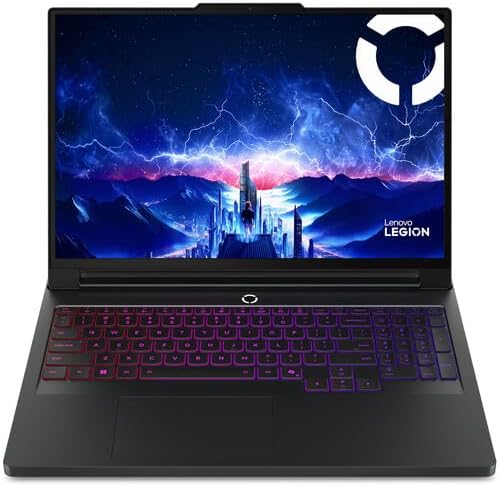
Lenovo Legion 7i Gen 10 Gaming Laptop (Best Overall)
Specifications
- Intel Core Ultra 9 275HX (24 cores)
- NVIDIA GeForce RTX 5080 16GB
- 16″ WQXGA OLED 240Hz, 500 nits
- 64GB RAM, 2TB SSD
- OS: Windows 11 Pro
The Lenovo Legion Pro 7i is our pick for the best metal gaming laptop overall. If you’re after a gaming laptop with a premium metal build that really packs a punch for gaming and work, the Lenovo Legion Pro 7i Gen 10 is our top pick for 2026. It combines an aluminum lid and bottom cover with some of the most powerful hardware available in a laptop today.
Inside, the Intel Core Ultra 9 275HX and NVIDIA GeForce RTX 5080 handle the latest AAA games at high settings, while 64GB of RAM and a 2TB SSD give you plenty of room for multitasking, streaming, and a large game library.
The 16-inch WQXGA OLED display runs at 240Hz with 500 nits of brightness, delivering deep blacks, vivid colors, and ultra-smooth motion.
2026 update: Lenovo has released the Legion Pro 7i Gen 11 with the faster Intel Core Ultra 9 290HX Plus. The Gen 10 linked here uses the same aluminum chassis and remains a strong buy while Gen 11 stock reaches Amazon.
Design
The Legion Pro 7i Gen 10 has a clean, understated design with a sturdy aluminum top and bottom cover. It looks professional enough for the office while still offering per-key RGB lighting for gaming.
Build Quality
The metal construction gives it a solid, premium feel with very little flex, and Lenovo’s Coldfront vapor-chamber cooling helps the hardware stay cool and stable during long gaming sessions.
Performance & Features
With the RTX 5080 and DLSS 4, you get excellent frame rates in modern games, while Lenovo AI Engine+ automatically tunes performance. Thunderbolt 4, HDMI 2.1, and Wi-Fi 7 keep you connected.
Pros
- Premium aluminum lid and bottom cover
- Top-tier Core Ultra 9 and RTX 5080 performance
- Stunning 240Hz OLED display
- 64GB RAM and 2TB SSD for heavy multitasking
Cons
- Premium price
- Heavier than thin-and-light picks
MSI Titan 18 HX AI Gaming Laptop (Best Premium 18 inch)

Specifications
- Intel Core Ultra 9 290HX
- NVIDIA GeForce RTX 5090
- 18″ UHD+ Mini LED 240Hz
- 64GB DDR5 RAM, 4TB SSD
- Thunderbolt 5, Wi-Fi 7
If money is not a blocker, this is the most powerful metal gaming laptop you can buy. The MSI Titan 18 HX AI is the ultimate desktop-replacement gaming laptop for 2026. It is built with a magnesium-aluminum alloy chassis that combines durability with a premium feel, and it packs the most powerful laptop hardware you can buy.
It runs on the new Intel Core Ultra 9 290HX and an NVIDIA GeForce RTX 5090, with a massive 64GB of DDR5 RAM and a 4TB SSD. This is enough power for 4K gaming, streaming, 3D rendering, and AI workloads all at once. The huge 18-inch UHD+ (3840 × 2400) Mini LED display runs at 240Hz, giving you incredible detail and HDR brightness.
Design
The Titan 18 HX AI has a bold, premium design with RGB lighting accents and a striking 18-inch display that makes it the centerpiece of any gaming setup.
Build Quality
Its magnesium-aluminum alloy chassis is strong and rigid, and the advanced cooling system sustains high performance during long, intensive tasks.
Performance & Features
With Thunderbolt 5, Wi-Fi 7, and a 4TB SSD, it is ready for any setup. The RTX 5090 delivers top-end frame rates with full ray tracing and DLSS 4.
Pros
- Magnesium-aluminum alloy chassis
- Flagship Core Ultra 9 290HX and RTX 5090
- Stunning 18-inch 4K Mini LED 240Hz display
- 64GB RAM and 4TB SSD
Cons
- Very expensive
- Large and heavy – a desktop replacement
ASUS ROG Zephyrus G16 Gaming Laptop (Best for Creators)

Specifications
- Intel Core Ultra 9 386H (Panther Lake, 16 cores)
- NVIDIA GeForce RTX 5080 16GB
- 16″ 2.5K OLED 240Hz, 1,100-nit HDR
- 64GB LPDDR5X RAM, 4TB SSD
- OS: Windows 11 Pro
The 2026 ASUS ROG Zephyrus G16 is the thinnest way to get RTX 5080 power in a fully metal body. Its CNC-machined aluminum unibody is just 14.9mm thick, and its brighter OLED makes it our top pick for photo and video editing between gaming sessions. For more editing-focused options, see our best laptops for video editing.
It runs on the new Intel Core Ultra 9 386H (Panther Lake) processor with an NVIDIA GeForce RTX 5080 GPU that can draw up to 160W in Manual mode, plus 64GB of LPDDR5X-8533 memory and a 4TB SSD in the configuration we link to.
Design
The Zephyrus G16 comes in Platinum White or Eclipse Gray aluminum with a clean, minimalist look that fits a studio desk as well as a gaming setup.
Build Quality
The unibody aluminum chassis feels rigid with no deck flex, weighs about 1.95 kg in the RTX 5080 version and packs a 90Wh battery with USB-C charging up to 100W.
Performance & Features
The 16-inch ROG Nebula OLED panel runs at 2560×1600 and 240Hz with a 0.2ms response time, 100% DCI-P3 color and up to 1,100 nits of HDR brightness. Wi-Fi 7, HDMI 2.1 and an SD card reader round out the connectivity.
Pros
- CNC-machined aluminum unibody, 14.9mm thin
- Bright 1,100-nit HDR OLED at 240Hz
- RTX 5080 performance in a 16-inch slim laptop
- Strong speakers and plenty of ports
Cons
- Fans get loud in Turbo and Manual modes
- RAM is soldered and not upgradeable
HP Omen 14 (Best Value & Best 14 inch)

Specifications
- Intel Core Ultra 9 285H (16 cores)
- NVIDIA GeForce RTX 5070
- 14″ 3K OLED 120Hz, 100% DCI-P3
- 32GB RAM, 1TB SSD
- 3.6 lbs, Thunderbolt 4
For buyers who want the best metal gaming laptop under a 16-inch size, start here. The HP OMEN Transcend 14 is a compact, metal-bodied gaming laptop that is just as good for content creation as it is for gaming. At only about 3.6 lbs, it is one of the most portable gaming laptops you can buy.
It is powered by an Intel Core Ultra 9 285H processor and an NVIDIA GeForce RTX 5070 GPU, with 32GB of RAM and a 1TB SSD, giving you enough power for gaming, photo editing, and video work on the go.
Its 14-inch 3K (2880 × 1800) OLED display covers 100% of the DCI-P3 color gamut with HDR 500 nits, making it ideal for color-accurate creative work.
Design
The OMEN Transcend 14 has a slim, premium metal design with a subtle 4-zone RGB keyboard, so it looks professional without giving up its gaming personality.
Build Quality
Its sturdy, compact metal chassis is built to travel, and a 71Wh battery keeps you working longer when you are away from the charger.
Performance & Features
You get Thunderbolt 4, USB-C, Wi-Fi 6E, and an RTX 5070 with DLSS 4 support, so you can game, edit, and connect external displays with ease.
Pros
- Compact metal build at about 3.6 lbs
- Color-accurate 3K OLED display
- Core Ultra 9 and RTX 5070 power
- 32GB RAM for creative work
Cons
- 120Hz screen is slower than 240Hz rivals
- RTX 5070 limits max settings in the newest AAA games
Razer Blade 16 (Best Thin & Stylish)

Specifications
- Intel Core Ultra 9 386H (16 cores)
- NVIDIA GeForce RTX 5070 Ti 12GB (140W)
- 16″ QHD+ OLED 240Hz, 0.2ms
- 32GB DDR5 RAM, 1TB SSD
- Wi-Fi 7, Thunderbolt 5
The Razer Blade 16 (2026) is the most stylish of the best metal gaming laptops on our list. Its CNC-machined aluminum unibody is just 14.9mm thin, yet it delivers high-end gaming and creative performance.
Inside, it features an Intel Core Ultra 9 386H processor and an NVIDIA GeForce RTX 5070 Ti with 12GB of GDDR7 memory, along with 32GB of DDR5 RAM and a 1TB SSD.
The 16-inch QHD+ OLED display runs at 240Hz with a 0.2ms response time and VESA DisplayHDR True Black 1000 certification, delivering stunning contrast and smooth gameplay.
Design
The Blade 16 has Razer’s signature sleek, minimalist look with a black CNC aluminum unibody and per-key Chroma RGB lighting.
Build Quality
The aluminum unibody is incredibly rigid and durable, and the vapor chamber cooling helps sustain performance during extended gaming sessions.
Performance & Features
With Wi-Fi 7, Thunderbolt 5, and a Calman Verified 100% DCI-P3 OLED display, the Blade 16 is ready for both serious gaming and professional creative work.
Pros
- Ultra-thin 14.9mm CNC aluminum unibody
- Gorgeous 240Hz QHD+ OLED display
- Powerful RTX 5070 Ti performance
- Wi-Fi 7 and Thunderbolt 5
Cons
- Expensive at higher GPU tiers
- Runs loud and hot under heavy load
What are the best metal gaming laptops in 2026?
The best metal gaming laptops in 2026 are the Lenovo Legion Pro 7i (best overall), MSI Titan 18 HX AI (most powerful, 18-inch), ASUS ROG Zephyrus G16 2026 (best for creators), HP OMEN Transcend 14 (best value and most portable) and Razer Blade 16 2026 (thinnest premium build).
Why Should I Choose a Laptop With Metal Body Over Plastic Ones for Gaming?
You’ll find that a laptop with metal body offers better durability and a premium feel compared to plastic alternatives. Metal chassis laptops tend to handle heat dissipation more effectively, which is crucial during long gaming sessions. Plus, they usually resist flex and wear better, so your investment lasts longer. If you want a gaming laptop that not only performs well but also stands up to daily use and travel, going for one with a metal body is a smart choice.
What Are the Key Features to Consider When Buying the Best Metal Gaming Laptop in 2026?
When you’re shopping for the best metal gaming laptop in 2026, focus on a few essentials: a powerful processor like the Intel Core Ultra 9 or AMD Ryzen 9, a dedicated graphics card from NVIDIA’s RTX 50 series, and fast, ample RAM – at least 16GB, though 32GB is ideal if you multitask or stream. Storage speed and size matter too, so look for NVMe SSDs with 1TB or more. Don’t forget the display quality and refresh rate; a 16-inch OLED or Mini LED screen with a 240Hz refresh rate offers smooth, vivid visuals. Also, check for a true aluminum or magnesium-alloy chassis and good cooling.
How Can I Maximize the Performance and Longevity of My Metal Chassis Gaming Laptop?
To get the most out of your metal chassis laptop, keep it clean and well-ventilated—using a cooling pad can help prevent overheating. Regularly update your drivers and Windows to ensure smooth performance.
If your laptop allows upgrades, consider adding more RAM or a larger SSD down the line to extend its usefulness. Also, avoid blocking air vents and try to game on a hard, flat surface. Finally, back up your data and create recovery media early on, so you’re prepared if you ever need to reset or troubleshoot your system. If something does go wrong, our complete laptop troubleshooting guide walks through the most common fixes.
Can you upgrade or customize components in metal gaming laptops easily?
Yes, component upgrades and customization in metal gaming laptops can vary. Some models offer user-accessible components for easy upgrades, while others may have limitations. Make sure to look out for laptop’s design and manufacturer guidelines for a smoother upgrading/customising experience.
Do HP laptops carry a metal body?
Some HP laptops do carry a metal body like pavilion series, envy series etc.. Some series are a mix of plastic and metal. Check with specific model to confirm.
Do aluminum laptops run hotter?
The surface can feel warmer because metal moves heat to the outside of the laptop, but the internal components usually run cooler. Internal temperatures depend more on the vapor chamber, fans and power limits than on the chassis material.
Are metal gaming laptops heavier?
Not always. Aluminum is strong enough to allow thinner panels, so a metal 16-inch laptop like the Razer Blade 16 (about 4.7 lb) can weigh less than many plastic 16-inch gaming laptops.
Is magnesium alloy as durable as aluminum?
Magnesium alloy is lighter but softer, so it dents more easily. Aluminum resists scratches and flex better, which is why most premium gaming laptops use it for the lid or the whole body.
Can you upgrade RAM in a metal gaming laptop?
It depends on the model. The 2026 ASUS ROG Zephyrus G16 and Razer Blade 16 use soldered LPDDR5X memory, while larger machines like the Lenovo Legion Pro 7i use upgradeable DDR5 slots.
Final Verdict
Of the best metal gaming laptops on this list, the right pick for most people is the Lenovo Legion Pro 7i: top-tier performance in an aluminum-topped chassis.
Want the most power regardless of price? Get the MSI Titan 18 HX AI. Creators should pick the ASUS ROG Zephyrus G16 (2026) for its bright OLED, while the HP OMEN Transcend 14 is the best value and the most portable.
For the slimmest premium build, the Razer Blade 16 (2026) is the one to beat. Whichever you choose, set your budget first, then pick the size – 14, 16 or 18 inches – that fits how you game.
If battery life matters most, see our list of gaming laptops with the best battery life, or check the best fanless gaming laptops for quieter play.